
24FileUploaded
Whenever 24Files uploads a file to your SharePoint, a Platform Event 24FileUploaded is generated that can be used to trigger Flows.
The Platform Event returns:
|
Field |
API name |
Description |
|
Record Id |
RecordId__c |
Salesforce record the file belongs to |
|
Filename |
Filename__c |
Name of the uploaded file |
|
Path (deprecated v7.09) |
Url__c |
Legacy field (max 255 characters). Still populated when the path fits |
|
Path Long |
Path_Long__c |
Full SharePoint file URL. Use this in new Flows and Apex. |
|
Upload Source |
UploadSource__c |
Describes how the upload was triggered: Manual (user upload via the LWC), Automatic (automatic file uploads), Apex (Flow, batch, or other Apex automation) |
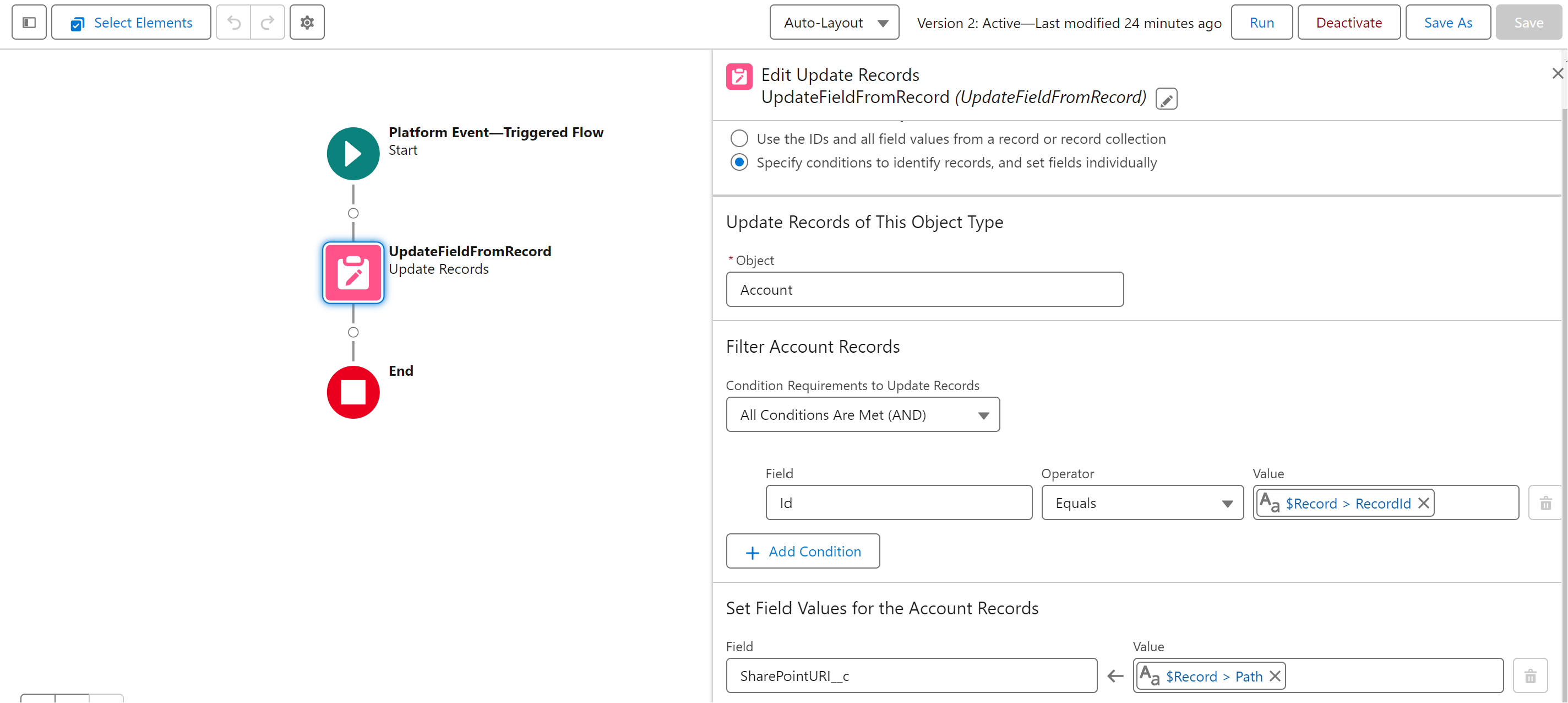
As an example, you can use this platform event to write the SharePoint URL of the file to a record field whenever a file is uploaded.
In the example below, we write the SharePoint URL returned by the Platform Event to a field named SharePointURI__c on an account record.
24Files Generic Event for Async Apex Actions
The 24Files Generic Event is raised when an async Apex action has finalized.
For these Apex actions, 24Files generates both an email and a platform event.
The 24Files Generic Event platform event has the following attributes:
-
Path: path to to the record folder.
-
RecordID: the ID of the record for which Apex action was executed.
-
Status: Success or Failed
-
Type: the name of the Apex Action that raised the platform event.
Event type
|
Item |
API name |
|---|---|
|
Event |
|
|
Path |
|
|
Record Id |
|
|
Status |
|
|
Type |
|
The Generic Platform Events for Async Apex Actions are published only when an email address is provided on the async Apex request. Without the email address, events are prepared but not published. Do pass email address if you want to subscribe to these events.
A generic platform event and email is sent for every record that is processed.
trigger X24FilesGenericEventTrigger on sfy_office365__X24Files_Generic_Event__e (after insert) {
  for (sfy_office365__X24Files_Generic_Event__e evt : Trigger.new) {
    if (evt.sfy_office365__Type__c != 'CreateFolder') {
      continue;
    }

    // evt.sfy_office365__Record_Id__c  -> Case Id (or other record)
    // evt.sfy_office365__Status__c     -> 'Success' or 'Failed'
    // evt.sfy_office365__Path__c       -> folder path

    if (evt.sfy_office365__Status__c == 'Success') {
      // folder create completed for this record
    } else {
      // create failed
    }
  }
}