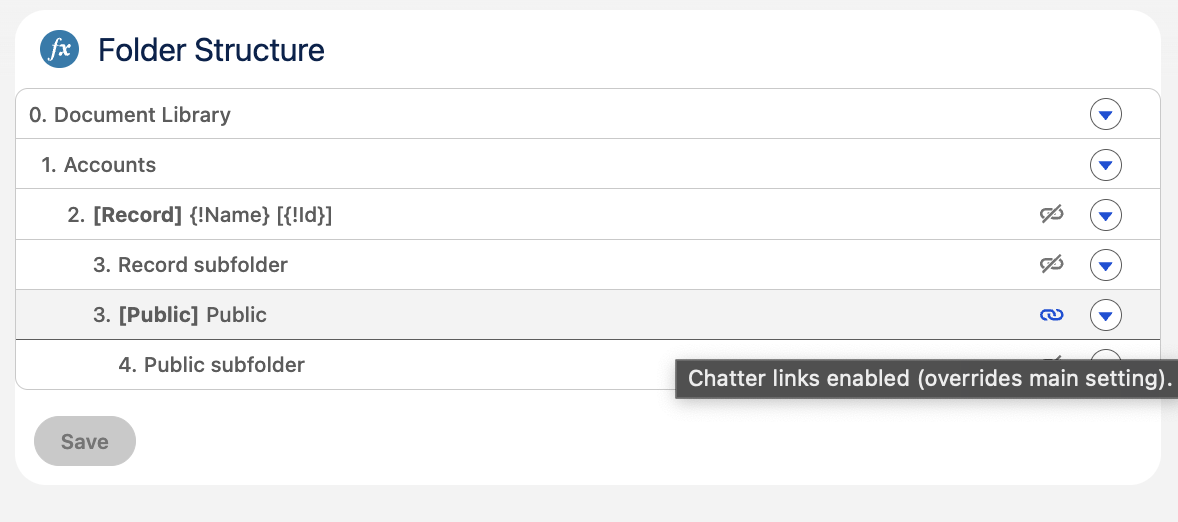
24Files automatically generates Chatter file links for SharePoint files. In large orgs, that can mean a lot of records. With this feature, we've added a way to control exactly where those links are allowed to be generated, either at the record-folder level or at a specific subfolder beneath it.

As a brief reminder: Chatter Files links are Salesforce records that contain links to files stored in SharePoint. Chatter File links are generated when:
-
At the initial load of the 24Files component on a record page, Chatter File Links are created for the files in the record folder (authenticated access mode) or in the public folder (anonymous access mode).
-
When a user uploads a file via the 24Files component, a Chatter File Link record is created for that file.
-
When a user opens a folder in the 24Files LWC component. In this case Chatter File Links are created for all files in the folder.
It is also possible to programmatically (via Apex actions) create Chatter File links without requiring that a user visits a specific folder. See the Salesforce Flows, Platform Events and APEX section of this documentation for more info on this.
The Folder Structure settings will override the default behavior, i.e. chatter file links will not be generated automatically nor via APEX if the Chatter File Link Generation is disabled on the folder structure.
Record-folder level
Each 24Files Folder Structure maps to an object (e.g. Account, Opportunity). You can toggle off the Chatter link generation right there on the Folder Structure or directly on the record-folder in the folder-structure editor.
Notes
-
If you change this setting, it resets all subfolders below it to that same value.
-
Folders above the record folder don’t have this option.
Per-folder overrides
Subfolders below the record folder don’t have to follow the main rule. You can override it by editing the subfolder in the folder-structure editor and toggling Disable Chatter Link Generation just for that folder.
This works both ways: if the main setting turns links off, you can toggle them back on for a specific subfolder. The most specific folder path wins.
The folders also now have an icon that shows you whether the toggle for that specific folder is on or off.